


Description
Fuel: Diesel
Serial : 4DLT
Year of Production: 1999-06
Fuel Pressure: su questi tipi di sistemi il carburante viene aspirato dalla PUMP di trasferta, per cui la pressione è nulla.
How to use:
1) Connect the MultiSERVE to the vehicle’s battery and choose program “Fuel System” (Red button)
2) Add 1 L of Wynn’s Injection System Purge or Diesel System Purge, depending on type of engine (petrol or diesel), into the appropriate tank.
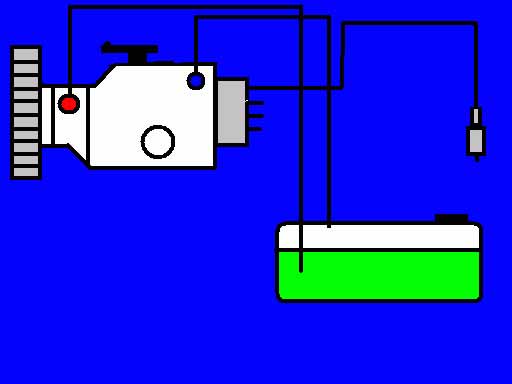
3) Connect the hoses to the vehicle (RED: fuel pressure line/ BLUE: fuel return line). Make a loop by connecting the remaining open fuel supply and return lines to each other if the car is equipped with a fuel booster pump.
4) Choose duration of the program (fast, heavy or customize) by turning the black button. Push the button to select.
5) Set the work pressure following the car manufacturer’s specifications.
6) Press START button and start vehicle engine.
7) During the treatment accelerate the engine from 1000 rpm to 2500 rpms as many times as possible to allow the product to reach its full cleaning effciency. Machine will emit a beep at the end of treatment.
8) Stop the car and disconnect the MultiSERVE from the car.
9) Re-establish the fuel system by connecting the fuel lines as originally configured.
8. Put the red hose back in the appropriate container. Purge the machine by pressing “START” for 3 seconds. End of treatment. Operation is completed.
Fuel System:
Fuel System:
Distributor injector pump LUCAS
The diesel fuel is sucked from the tank through the transfer pump that is located inside the high pressure.
Reviews
There are no reviews yet.